

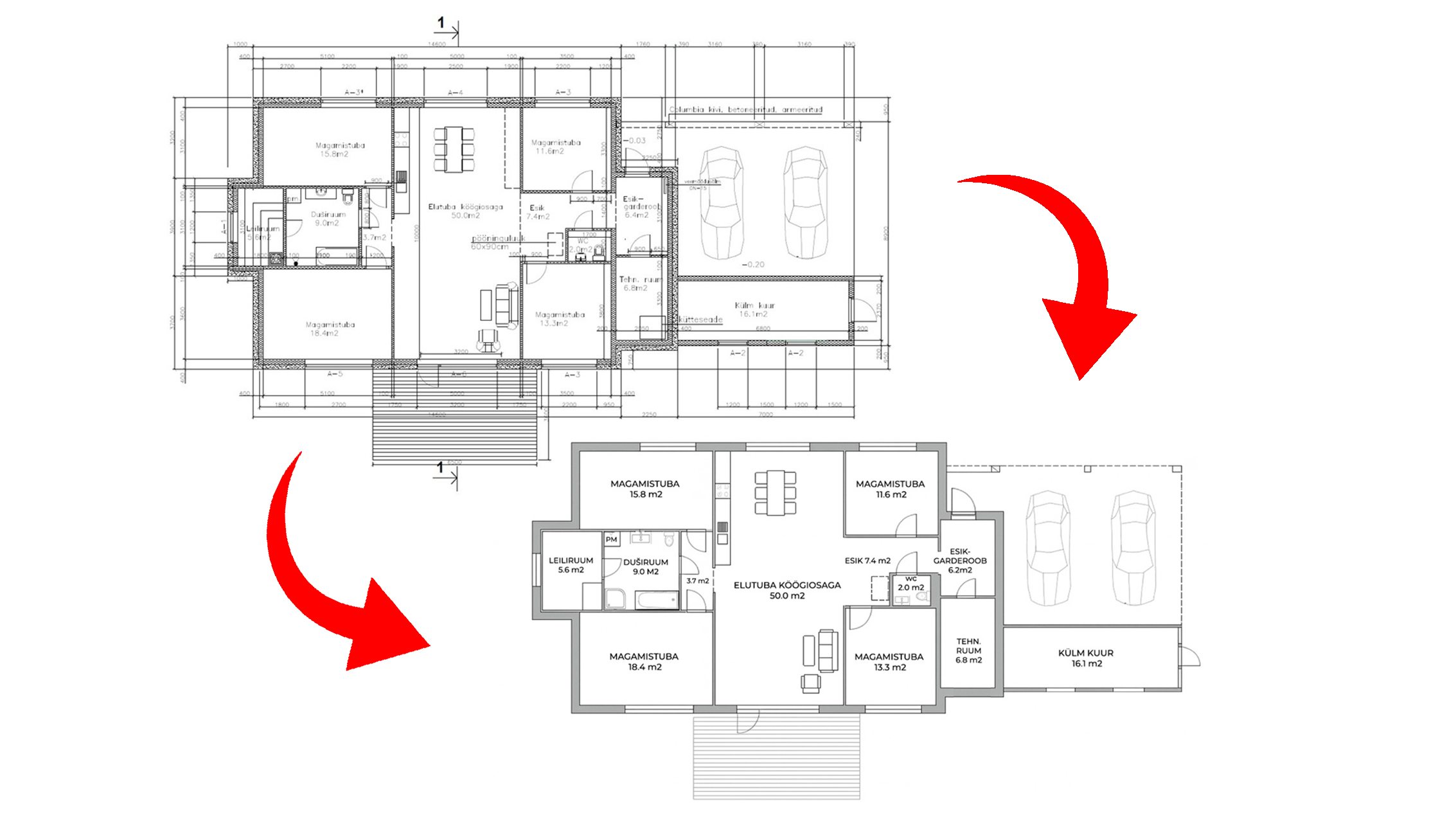
Simplified vs Technical Floor Plan — Which Do You Actually Need?
A simplified floor plan is a clean 2D layout diagram designed for non-technical readers. It shows room shapes, labels, and approximate dimensions — everything a buyer needs to understand a property layout, with no construction notation.
A technical floor plan is a precision construction document. It includes exact dimensions, wall thickness, structural notation, and CAD-standard annotation — designed for architects, engineers, and contractors.
The difference matters because using the wrong type for the wrong purpose either confuses buyers or frustrates construction professionals.
Key Facts
– Simplified floor plans are the standard format for all real estate listings and property marketing
– Technical floor plans in DWG format are required for renovation projects, building permits, and construction work
– 55% of buyers rate floor plans as “very useful” when browsing listings (National Association of Realtors)
– 80% of architects use design software, making DWG the standard exchange format (OpenAsset, 2024)
– Both types cost the same at Replanera — pricing is based on floor area, not plan type
– Both can be produced from the same source drawing in a single order
– Replanera delivers both types in 1–3 business days
Side-by-Side Comparison
| Feature | Simplified Floor Plan | Technical Floor Plan |
|---|---|---|
| Designed for | Buyers, renters, property marketing | Architects, engineers, contractors |
| Typical use | Real estate listings, brochures, presentations | Renovation projects, building permits, CAD workflows |
| Dimensions shown | Key room dimensions | Full dimension system, every measurement |
| Wall thickness | Not shown | Shown accurately |
| Door/window symbols | Simple, readable | Engineering standard symbols |
| File formats | JPG, PDF | DWG (AutoCAD), also PDF |
| Reading difficulty | Immediately readable by anyone | Requires technical knowledge |
| Replanera delivery | 1–3 business days | 1–3 business days |
| Price | Same — based on floor area | Same — based on floor area |
Simplified Floor Plans — Who They’re For and When to Use Them
A simplified floor plan answers one question for a buyer: “How does this property work?”
It shows:
- The shape and relative size of every room
- How rooms connect to each other
- Where the doors and windows are
- Room labels (living room, bedroom 1, bathroom, etc.)
- Total floor area
It does not show: wall thicknesses, structural annotations, dimension chains across the entire drawing, or engineering notation. These details serve professionals, not buyers.
Listings with floor plans receive up to 52% more click-throughs from buyers (Rightmove), and floor plans are opened 7.5 times more often than maps on property portals (CubiCasa). A simplified plan is the format that drives this engagement.
Use a simplified floor plan for:
- Property listings on any portal (KV.ee, City24, Rightmove, Zillow)
- Sales brochures and presentation materials
- Rental listings
- Social media property posts
- Interior design mood boards
Do not use a simplified floor plan for:
- Building permit applications (authorities require technical drawings)
- Renovation contractor briefs
- Heating, electrical, or plumbing system design
- Structural assessments
Technical Floor Plans — Who They’re For and When to Use Them
A technical floor plan is a working document. It’s not meant to be attractive — it’s meant to be precise.
It contains everything a simplified plan has, plus:
- Exact wall thicknesses and construction layers
- Full dimension system (every wall, every opening measured)
- Engineering symbols for doors, windows, stairs
- Coordinates and reference points
- Layer organisation for CAD software
- Scale reference and north arrow
Use a technical floor plan for:
- Building permit applications
- Renovation projects (heating systems, electrical work, plumbing)
- Structural assessments and surveys
- Architect working files
- Homeowners’ association records that require precision documentation
In DWG format specifically:
- Any workflow using AutoCAD, BricsCAD, or other CAD software
- Engineering project base drawings
- Any work where the floor plan will be edited or annotated digitally
Which One Do You Need Right Now?
If you’re selling or renting a property: simplified floor plan in JPG and PDF.
If you’re starting a renovation or construction project: technical floor plan in DWG.
If you’re doing both: order both at the same time. Replanera produces both from the same source drawing in a single order — no duplicate work, no extra cost.
If you’re applying for a building permit: over 80% of top municipalities now require digital permit submissions (ScienceDirect, 2022). Technical drawings in DWG or PDF format are the standard. Check with your local authority before ordering.
What Replanera Produces by Default
For property listing orders, Replanera produces a simplified floor plan — clean, clearly labelled, resolution-appropriate for all major property portals.
For construction and renovation orders, Replanera produces a technical floor plan in DWG format, with the dimension system and layer organisation that construction professionals expect.
If you’re not sure which type your project needs, describe your situation in your order or email projects@replanera.com — we’ll advise before starting.
Frequently Asked Questions
Q: What is the difference between a simplified and a technical floor plan?
A: A simplified floor plan shows rooms, labels, and basic dimensions in a clean format readable by anyone — used for property listings. A technical floor plan is a precision construction document with exact dimensions, wall thicknesses, and engineering notation — used for renovation projects, permits, and CAD workflows.
Q: Can a simplified floor plan be used for a building permit application?
A: Usually not. Building authorities require technical drawings in DWG format with precise dimension systems. If you’re applying for a permit, order the technical version.
Q: Are simplified and technical floor plans the same price?
A: Yes. Both types are priced identically. Price is based on floor area, not plan type.
Q: What if I need to add furniture to the plan?
A: We can produce a furniture layout version of a simplified floor plan. Useful for interior design presentations or staging proposals. Mention it in your order notes.
Q: My architect gave me a DWG file — can you simplify it for my listing?
A: Yes. This is a common request. Send the DWG and we produce a clean, buyer-friendly simplified version.
Q: What if I later need the technical version after ordering a simplified one?
A: We retain your source data on file. Converting from simplified to technical is possible — contact us to discuss scope and timeline.
Need both types from the same drawing? One order covers it — see how the process works.
Related: Digital Floor Plans – The Secret Weapon of Real Estate Listings | From a Hand-Drawn Sketch to a Professional Digital Floor Plan
Also see: For home sellers

