

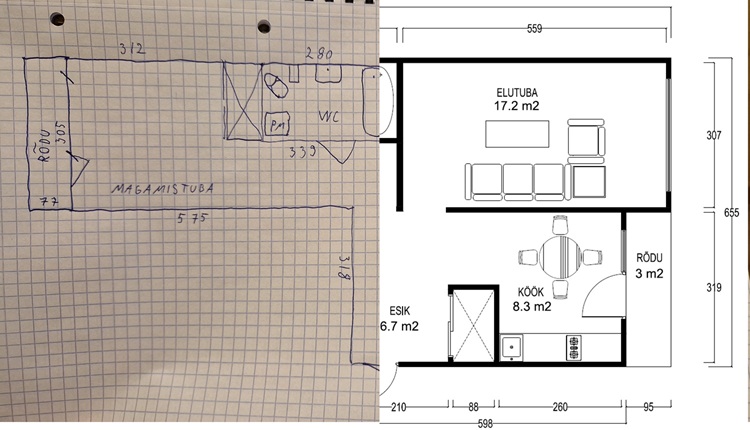
From a Hand-Drawn Sketch to a Professional Digital Floor Plan
Floor plan digitization is the process of converting a hand-drawn sketch or paper floor plan into a professional digital file — typically delivered in JPG, PDF, and DWG formats. At Replanera, this takes 1–3 business days. The starting point can be as rough as a pencil sketch on a blank sheet of paper, as long as room dimensions are marked.
Key Facts
– A hand-drawn sketch with dimensions is a valid starting point for professional floor plan digitization
– Replanera converts sketches to digital floor plans in 1–3 business days
– Output is delivered in JPG, PDF, and DWG — all three at the same price
– All revisions are free until the client is satisfied
– A phone photo of an existing paper plan is sufficient to start an order
– 80% of architects now use design software, making DWG the standard working format (OpenAsset, 2024)
– Listings with floor plans receive up to 52% more click-throughs from buyers (Rightmove)
Why Do You Need a Floor Plan If You Already Know Your Property?
It’s a fair question. You live there, you know every corner — why spend time on a drawing?
The answer depends on what you’re planning to do:
- Selling or renting a property? Listings with a floor plan attract up to 52% more click-throughs (Rightmove). A buyer wants to understand whether the layout suits their needs before booking a viewing. No floor plan means no mental picture — and that often means skipping to the next listing.
- Planning a renovation? Heating, ventilation, and electrical projects all require a precise floor plan. Without one, the contractor measures everything on-site — extra time and cost that falls on you.
- Applying for a building permit? Over 80% of top municipalities now require digital submissions (ScienceDirect, 2022). A photo of a hand-drawn sketch will not be accepted — DWG or PDF format is the standard.
- Homeowners’ association documentation? In older apartment buildings, original drawings are often lost, damaged, or no longer reflect what was actually built.
In every one of these situations, a hand-drawn sketch is a perfectly valid starting point.
What Kind of Sketch Qualifies?
The threshold is low. You don’t need to be an artist or a draughtsperson. The sketch simply needs to convey the shape of the rooms and their measurements.
These work:
- Graph paper or blank sheet sketch — as long as all rooms are included and measurements are written down
- A phone photo of an old paper drawing — even a yellowed, worn plan works if the text is legible
- An architect’s technical drawing — even as a scanned PDF
- Partially legible drawings — if something is unclear, we ask before proceeding
These don’t work:
- A sketch without measurements — without dimensions, we cannot produce an accurate plan
- A photo taken in heavy shadow or with glare — take the picture in good natural light with the whole drawing in frame
Practical tip: If you’re drawing from scratch, use a ruler. Clearly mark each room’s width and length. Approximate door and window positions are helpful too.
What to Include on Your Sketch
The more accurate information you provide, the more accurate the finished plan will be.
Must-have:
- Dimensions of all rooms (width × length)
- Approximate door positions
- Approximate window positions
- Load-bearing walls (if known)
Helpful to add:
- Number of floors (if multi-storey)
- Staircase location
- Balcony, terrace, or other exterior spaces
- Bathroom and toilet location
You don’t need:
- Furniture (unless you want a furniture layout plan)
- Exact angles
- Building materials
How the Digitization Process Works — Step by Step
Step 1: Upload Your Drawing
Go to the Replanera price calculator and upload your sketch in JPG, PNG, PDF, or DWG format. A phone photo works just as well as a scanned document.
The calculator shows an approximate price immediately — based on floor area, with no hidden fees.
You can also send the drawing directly to projects@replanera.com.
Step 2: We Review and Confirm
We look over the sketch and contact you if anything is unclear. If a measurement is missing, we ask — we never guess on your behalf.
This step typically takes a few hours.
Step 3: Your Floor Plan Is Ready in 1–3 Business Days
Our team digitizes the drawing using professional CAD software. The finished plan is delivered in:
- JPG / PNG — for property listings, presentations, brochures
- PDF — for printing, documentation, permit applications
- DWG — for construction projects and architects using AutoCAD
All three formats are included in the same price.
Step 4: Free Revisions Until You’re Satisfied
If the finished plan doesn’t match what you needed — a wrong dimension, a missing door, an incorrectly labelled room — send feedback and we’ll correct it. All revisions are 100% free, with no limit on rounds.
What Does the Finished Plan Include?
A professional digital floor plan from Replanera contains:
- All rooms at correct proportions
- Dimension lines (room measurements clearly marked)
- Door and window positions
- Room labels (living room, bedroom, kitchen, etc.)
- Total floor area calculation
A simplified plan (for property listings) has a clean layout — buyers can read the full apartment structure at a glance.
A technical plan (for construction projects) additionally includes structural details, a full dimension system, and coordinates where required.
Not sure which type you need? Read the guide: Simplified Floor Plan vs Technical Floor Plan.
Before and After — A Typical Project
A client sends a photo of an old yellowed paper drawing from the 1970s. Parts are barely legible. Some dimensions are missing.
We clarify the missing measurements via email. Within two days, there’s a clean, dimensioned digital floor plan ready in DWG and PDF — used for both a homeowners’ association documentation update and a property sales listing.
Frequently Asked Questions
Q: Is a phone camera photo of a sketch good enough?
A: Yes, in most cases. The key is good light with the whole drawing visible in the frame. Heavy shadows or reflections can cause problems — if that happens, we’ll ask for a clearer photo.
Q: What if I don’t know the exact dimensions of some rooms?
A: Mark the approximate dimensions and note they’re estimates. Digital floor plans don’t require millimetre precision — a good approximation works fine.
Q: Can I order a floor plan for just one room?
A: Yes. A single room, one floor, or part of a building can all be digitized. Price is calculated based on that area.
Q: How long does digitization take?
A: Standard delivery is 1–3 business days. Rush orders can be discussed separately.
Q: Which file formats does the finished plan come in?
A: JPG, PDF, and DWG — all three at the same price. DWG is for AutoCAD users: construction firms and architects.
Q: Do revisions cost extra?
A: No. All revisions are 100% free, with no limit on rounds. We work until you’re happy with the result.
Q: Can I get the floor plan labelled in English?
A: Yes. Room labels in English are available — useful for international buyers or cross-border real estate listings.
Ready to start? Try the price calculator or contact us.
Related: Simplified vs Technical Floor Plan — Which Works Best? | 5 Common Problems with Old Floor Plans

