

5 Common Problems with Old Floor Plans (and How to Fix Them)
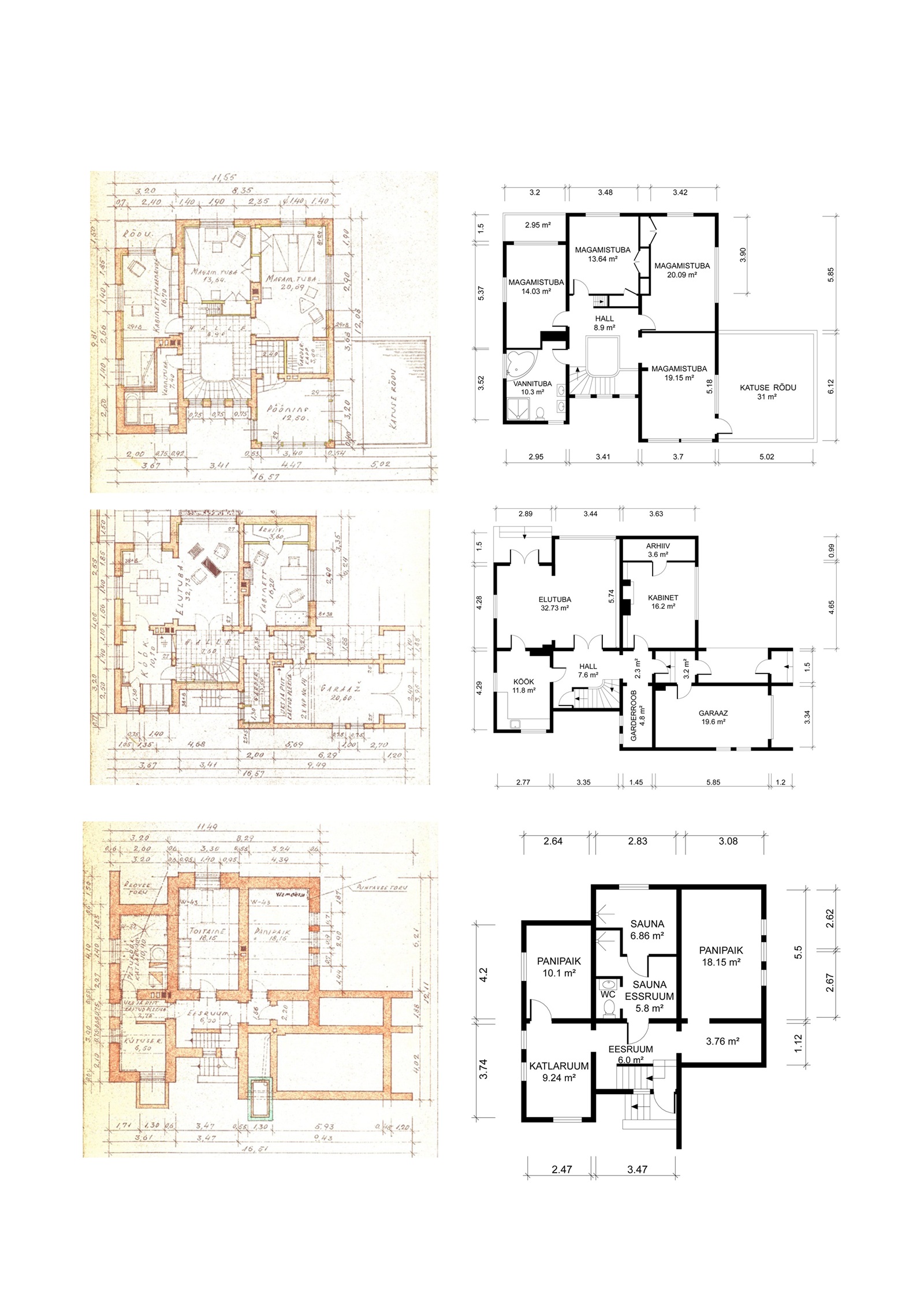
Floor plan digitization is the process of converting a physical or outdated floor plan into a clean, accurate digital file in standard formats like JPG, PDF, or DWG. For older properties, this conversion is often the difference between a usable document and a liability.
A property listing without a floor plan is incomplete. But a listing with a bad floor plan can be worse. Old, unclear, or inaccurate floor plans hurt listings and stall construction projects.
Key Facts
– 1 in 5 buyers will skip a listing that has no floor plan (iGUIDE buyer research)
– Over 80% of top municipalities now require digital permit submissions (ScienceDirect, 2022)
– 80% of architects use at least one type of design software for their projects (OpenAsset, 2024)
– Hiring an architect to redraw a plan from scratch costs $2,000–$20,000 in the US (HomeGuide, 2026)
– Replanera digitizes old floor plans in 1–3 business days with free revisions — from any paper source
Here are the five most common problems we see when clients send us their existing floor plans, and how digital conversion resolves each one.
Problem 1: The Plan No Longer Matches the Property
Buildings change over time. Walls get removed. Rooms get merged. Kitchens get extended. The floor plan stays exactly as it was when it was drawn — often decades ago.
The result is a document that does not represent the property. For a buyer, this creates confusion and distrust. For a contractor, it creates costly surprises mid-project. According to construction industry research, projects that rely on outdated documentation encounter unexpected costs due to on-site decisions that increase labour hours and waste materials (Premier Construction & Design).
How we fix it: If you provide a rough sketch or measurements of the current state, we digitize the actual layout — not the historical one. The finished plan reflects the property as it stands today.
If you are unsure how to measure the space, our guide page explains the process. Here’s how to order a digital floor plan.
Problem 2: The Dimensions Are Missing or Illegible
Hand-drawn plans from older properties often have dimensions written in faint pencil, annotated in non-standard formats, or simply missing. Some plans have been photocopied so many times that the numbers are smudged beyond reading.
Without reliable dimensions, a floor plan is decorative. It might look like a proper drawing, but it provides no useful information about room sizes.
How we fix it: When dimensions are partially legible, we work with what is visible and ask you to confirm or measure the unclear sections. We never assume or estimate measurements. The result is a plan where every room has a confirmed, accurate dimension.
Problem 3: The Plan Is in a Format No One Can Use
We regularly receive plans that exist only as a faded photocopy, a scan of a scan, or a blurry JPG image. The architect needs a DWG file — a vector-based CAD format that can be edited, scaled, and overlaid with engineering drawings. The permit authority needs a PDF with proper dimensions. The property portal needs a clean PNG.
The original document, in whatever state it’s in, cannot be submitted anywhere useful. This is an increasingly common problem: more than 80% of the top 500 municipalities now require online digital submissions for building permits (ScienceDirect, 2022).
How we fix it: We produce the finished digital plan in all three standard formats — JPG/PNG, PDF, and DWG — as part of every order. One source drawing, three usable outputs. See our full range of services.
Problem 4: The Plan Is Technically Accurate but Visually Unpresentable
Some older properties have well-maintained technical drawings. Accurate, complete, and professionally produced at the time. The problem: they were designed for architects and contractors, not for property buyers.
A technical floor plan is a precision document covered in structural annotations, dimension lines, hatch patterns, and engineering symbols. In a property listing, this kind of plan creates more confusion than it resolves.
A simplified floor plan strips away that complexity. It shows room shapes, labels, relative positions, and total floor area. A buyer can read it in seconds without any technical training.
How we fix it: We produce a simplified version that presents the layout in a clean, buyer-friendly format. Rooms are labelled, overall floor area is shown, doors and windows are visible — and nothing else.
Read more: Simplified Floor Plan vs Technical Floor Plan.
Problem 5: The Plan Exists but Has Never Been Digitized
This is the most common situation. The plan exists on paper — in a drawer, a folder, or an archive. It might be in good condition. But it has never been converted to a digital format.
That means it cannot be submitted electronically, edited, scaled accurately, or shared cleanly. Every time the property changes hands, someone has to photograph it (producing a low-quality, distorted image) or commission a new drawing from scratch.
How we fix it: We digitize the plan from whatever physical source you provide — a photograph, a scan, a photocopy. If the paper plan is in good condition and dimensions are clear, delivery takes 1–3 business days.
Paper Floor Plan vs Digital Floor Plan
| Feature | Paper Floor Plan | Digital Floor Plan (JPG/PDF/DWG) |
|---|---|---|
| Editable | No — any change requires redrawing | Yes — dimensions, labels, and layout can be updated |
| Scalable | No — resizing distorts proportions | Yes — scales accurately at any size |
| Submittable for permits | Rarely — most authorities require digital files | Yes — PDF and DWG accepted by all major permit systems |
| Shareable | Only by scanning or photocopying | Instantly by email or upload |
| Degrades over time | Yes — paper fades, tears, and loses legibility | No — digital files remain identical indefinitely |
| Usable with CAD software | No | Yes — DWG files open directly in AutoCAD and similar tools |
When Is It Better to Start from Scratch?
Sometimes the existing plan is in such poor condition that working from it would slow the process. If the drawing has no legible dimensions, the building structure is unclear, or major changes have been made since it was drawn, starting from a fresh sketch may be faster.
If you are unsure, send us the existing drawing before ordering. We will assess it and give you an honest recommendation — including whether we can work with what you have or whether a new sketch would serve you better.
Contact us — we respond the same day.
Frequently Asked Questions
Q: Can a floor plan from the 1970s or 1980s be digitized?
A: Yes. We regularly work with very old drawings. Age alone is not a problem. The main requirement is that room shapes and dimensions are still legible.
Q: What if my property has been extended since the original plan was drawn?
A: You can sketch the current layout yourself (including the extension) or provide measurements of the new sections. We incorporate the changes so the digitized plan reflects the property as it stands today.
Q: My plan is a low-resolution JPG scan. Is that good enough?
A: It depends on quality. If dimensions and room boundaries are clearly visible, it usually works. If the image is heavily pixelated, we may ask for a better scan or a photo taken in good light.
Q: Can you correct errors in an old floor plan?
A: If you provide measurements of what the property actually looks like now, yes. We produce the plan based on the correct current state rather than the outdated original.
Q: How long does it take to digitize an old floor plan?
A: Standard delivery is 1–3 business days. If there are many unclear sections needing your confirmation, it may take slightly longer — but we tell you upfront.
Q: How much does it cost to digitize an old floor plan?
A: The price is based on floor area. Enter the approximate area into the price calculator and see the price immediately. All formats (JPG, PDF, DWG) and all revisions are included.
Have an old floor plan you are not sure about? Upload it for a free assessment — we will tell you exactly what is possible.
Related: Digital Floor Plan from an Old Paper Drawing | From a Hand-Drawn Sketch to a Professional Digital Floor Plan
Also see: For real estate agents | 5-step listing checklist

